Convert Markdown to Slides with Marp

Open a Markdown file, then choose where each slide starts from the read-only outline. Save the result as PDF, right from your browser.

By using this tool, you agree to the Privacy Policy and Disclaimer.

Conversion runs in your browser. Your Markdown is not uploaded to our servers for processing.

Import Markdown

Drop a .md file or choose an input method to build your deck.

Max 10MB

Features

Everything you need to turn Markdown into slides

Turn Markdown into a presentation deck with a live Marp preview. Adjust slide breaks and image layout, then save the finished slides as PDF—free and browser-based.

  • Marp slide rendering

    Build a clean 16:9 presentation from familiar Markdown syntax

  • Flexible slide breaks

    Add or remove breaks directly from the read-only outline

  • Live deck preview

    Review every slide while you refine the presentation structure

  • Overflow warnings

    Spot slides that contain too much content before export

  • Image layout controls

    Resize and align images without rewriting the source document

  • PDF export

    Open the browser print preview and save the finished slide deck as PDF

See the workspace

Create a Marp slide deck in four steps

See the real workspace with sample Markdown loaded, then follow the path from import to download.
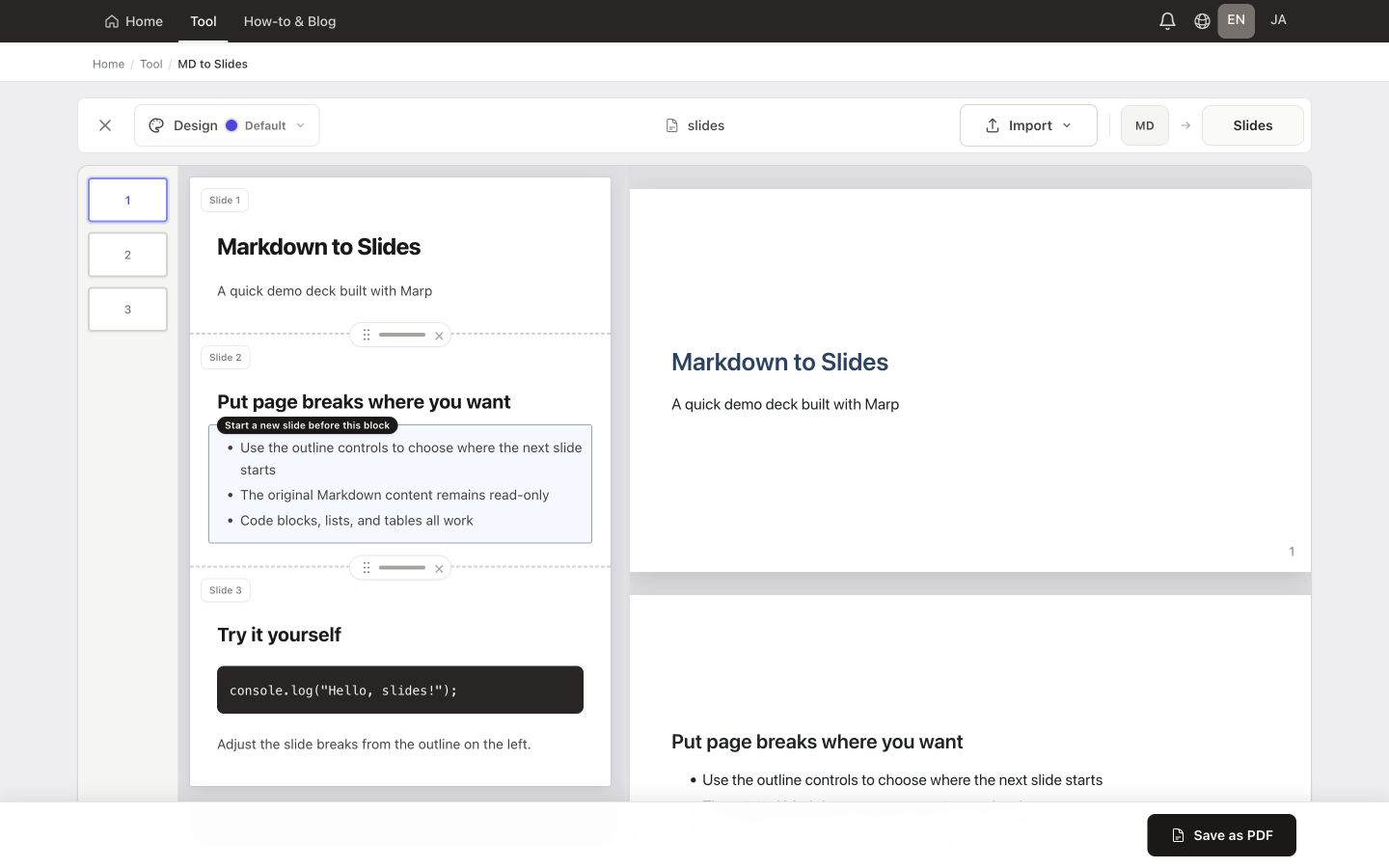
  1. Open a .md file, paste Markdown, import a public GitHub file, or load the sample
  2. Review the automatically prepared slide structure in the read-only outline
  3. Click content blocks to add or remove slide breaks, then adjust image size and alignment
  4. Check the live Marp preview and choose “Save as PDF” when the deck is ready
Convert Markdown to Slides with Marp — real conversion workspace with sample Markdown loaded
This is the actual workspace with sample Markdown loaded. Conversion stays in your browser.

Tips & use cases

Make Markdown slides easier to present

  • Keep one main idea per slide and move supporting detail into the next section
  • Use H2 headings as natural slide titles and short lists for speaking points
  • Watch for overflow warnings after adding code blocks, tables, or large images
  • Use explicit --- breaks when the automatic structure needs a different rhythm
  • Save as PDF for a fixed presentation layout that is easy to share

Ready to turn your Markdown into slides?

Open a Markdown file, refine the slide breaks in the outline, preview the deck with Marp, and save it as PDF.

Create Markdown Slides

Free · No sign-up · Conversion runs in your browser

Markdown to Slides FAQ

Is this a Marp-compatible Markdown slide converter?
Yes. The preview and slide output are rendered with Marp. Existing Marp frontmatter is preserved, and standard Markdown content is prepared as a 16:9 deck.
Can I choose where each slide starts?
Yes. Click blocks in the read-only outline to add or remove slide breaks without directly editing the imported Markdown text.
Can I export PowerPoint or PPTX?
This tool exports PDF through the browser print dialog. For an editable PowerPoint file, use the MD to PPTX tool, which rebuilds the same Marp slides as a .pptx download.
Are my Markdown files uploaded to a server?
Files you open or paste are processed in your browser for conversion. No account is required. Importing from a public GitHub URL fetches that file only when you request it.
What happens when a slide has too much content?
The outline shows an overflow warning so you can split the content, shorten it, or resize images before saving the deck.